What is a graphic design invoice?
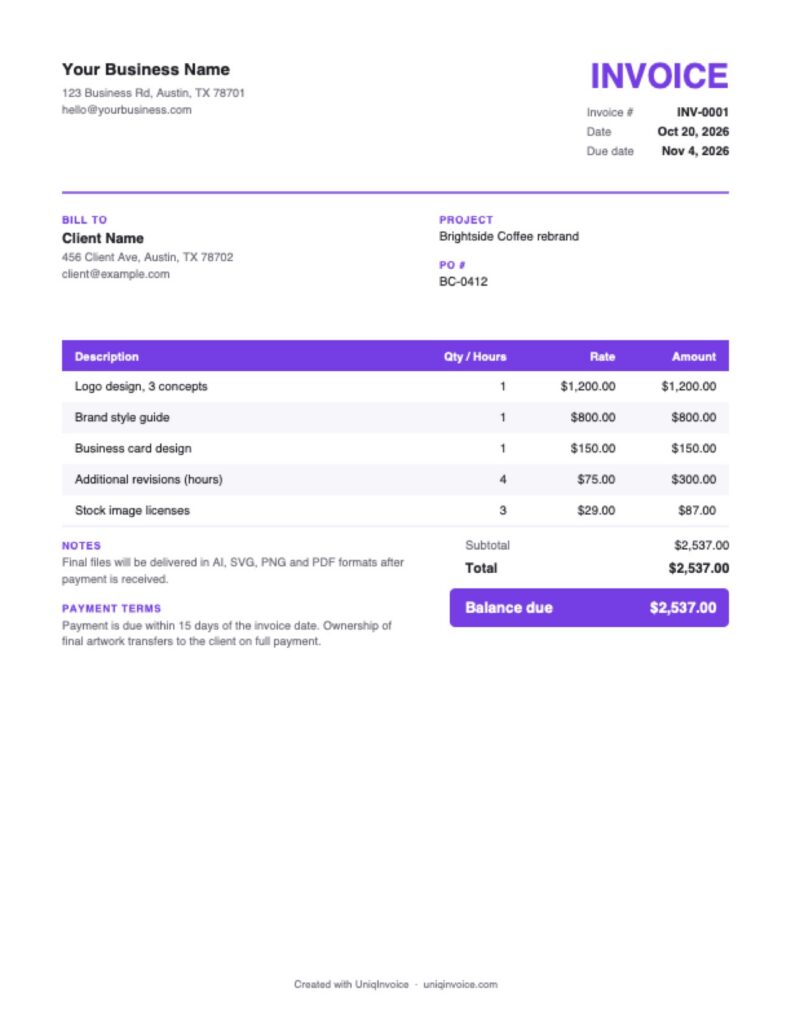
A graphic design invoice is the bill a designer or design studio sends for creative work such as logos, branding, print materials, packaging or digital graphics. A good design invoice describes the deliverables, shows what was included and what was extra, and explains when the client receives the final files.
This free template is made for freelance designers and small studios. It includes the project name and PO number, supports project prices and hourly revisions, and produces a clean, professional PDF.
What to include on a graphic design invoice
- Your details: your name or studio name, website, email and portfolio link.
- Client details: the company and contact you are billing.
- Project and PO number: so the client’s accounting team can match the invoice.
- Deliverables: logo, style guide, brochure, social graphics or packaging, each on its own line.
- Revisions: extra rounds or hours beyond what the project price includes.
- Third-party costs: stock images, fonts or printing.
- Deposit and balance: what was paid up front and what is still due.
- Terms: the due date, file delivery and ownership transfer.
How to fill out this graphic design invoice template
- Add your logo and contact details.
- Enter the client, project name and PO number if the client uses one.
- Check the invoice number and dates. The due date is set 15 days ahead.
- Replace the sample deliverables with your own, and add revision hours if needed.
- Enter the deposit in Amount paid, and tax if it applies.
- Review the notes about file delivery and ownership, then download the PDF.
How designers price their work
Project pricing
A fixed price for a defined scope, such as a logo with three concepts and two rounds of revisions. Clients like the certainty, and you are rewarded for working efficiently.
Hourly pricing
An hourly rate for ongoing work, small edits or projects with unclear scope. Track your time so the invoice is easy to justify.
Retainers
A monthly fee for a set amount of design work. It brings steady income and suits clients with regular needs.
Common graphic design invoicing mistakes
- Unclear revision limits. If the contract does not say how many rounds are included, extra revisions are hard to bill.
- No kill fee. If a client cancels halfway, a kill fee in your contract lets you bill for the work done.
- Sending final files too early. Once a client has the files, the urgency to pay is gone.
- Forgetting third-party costs. Fonts, stock photos and print proofs should be billed, not absorbed.
- Missing the PO number. Larger clients often cannot pay without one.
A short, clear contract and an invoice that matches it are the best protection for your time and creative work.
Tips to get paid faster
- Define the scope in writing. A clear list of deliverables and revisions prevents disputes over extra work.
- Take a deposit. It protects your time and shows the client is committed.
- Deliver final files after payment. Share previews or watermarked versions until the invoice is paid.
- Follow up politely. A reminder on the due date is usually all it takes.
UniqInvoice keeps every client project in one place, sends payment links and reminds clients automatically, so you can focus on design.