What is a bookkeeping invoice?
A bookkeeping invoice is the bill a bookkeeper or small accounting practice sends for keeping a client’s books. Most of it repeats every month, such as categorizing transactions and reconciling accounts, and the rest is extra work the client asked for along the way. A good invoice keeps those two apart, so the client knows what the monthly fee covers and what was added.
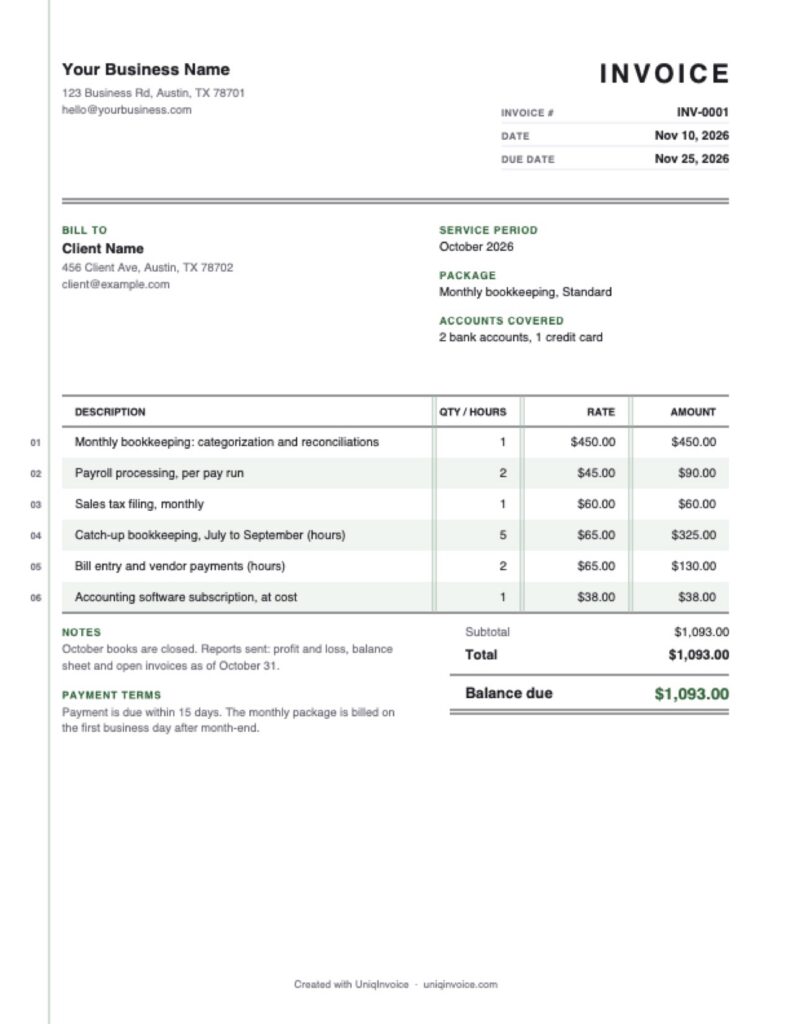
This free template uses a ledger layout. Line items are numbered in the margin, rows are shaded in bands, thin double rules separate the number columns, and the balance has a double underline, the way accountants mark a final total. It has fields for the service period, the package and the accounts covered, and it works out the totals for you.
What to include on a bookkeeping invoice
- Business details: your name or firm, email, phone and any credential you want clients to see.
- Client: the business you keep books for and the person who approves your invoices.
- Invoice number and dates: a unique number, the invoice date and the due date.
- Service period: the month or quarter the work covers.
- Package: the monthly plan and what it includes, on one line.
- Extra work: catch-up months, cleanup, payroll runs or filings, with hours or quantities.
- Pass-through costs: software subscriptions or filing fees you paid for the client.
- Reports delivered: a short note on what you sent, such as the profit and loss and balance sheet.
How to fill out this bookkeeping invoice template
- Add your logo and business details at the top.
- Enter the client, the service period, the package and the accounts you cover.
- Check the invoice number and dates. The due date is set 15 days ahead.
- Edit the sample lines for the monthly package, payroll, filings and hourly work.
- Enter any payment already received in Amount paid.
- Update the notes with the reports you delivered, then download the PDF.
How bookkeepers price their work
Monthly packages
A fixed fee for a defined scope, usually based on how many transactions and accounts the client has. Clients like the predictable cost, and you get steady income.
Hourly
Common for cleanup, catch-up work and anything that is hard to scope in advance. Keep a simple time log by task so the hours on the invoice are easy to back up.
Per item
Payroll runs, sales tax filings and year-end forms are often priced per run or per filing. A quantity and a rate on the invoice show the client how the amount was reached.
Keeping extra work off the monthly fee
Packages drift. A client opens a second bank account, starts selling online or falls three months behind on receipts, and suddenly the same fee covers twice the work. Bill anything outside the package on its own line, with the hours or the months it covers, even when the amount is small. After a few invoices the client can see the pattern for themselves, and the conversation about moving to a bigger package starts from numbers they have already paid.
Tips to get paid faster
- Invoice on the same day every month. Clients get used to the timing and plan for it.
- Set up recurring invoices. A fixed package can go out automatically.
- Send reports with the invoice. The client sees what they are paying for.
- Offer card or bank payment. Fewer steps for the client means fewer late payments.
UniqInvoice lets bookkeepers set up recurring invoices for monthly clients, accept card payments and send automatic reminders.