What is a pest control invoice?
A pest control invoice is the bill an exterminator or pest control company sends after a treatment, an inspection or a visit under a service plan. Many customers are on quarterly or monthly plans, and plenty of them still pay by check, so the invoice needs to be clear about what was done and easy to pay.
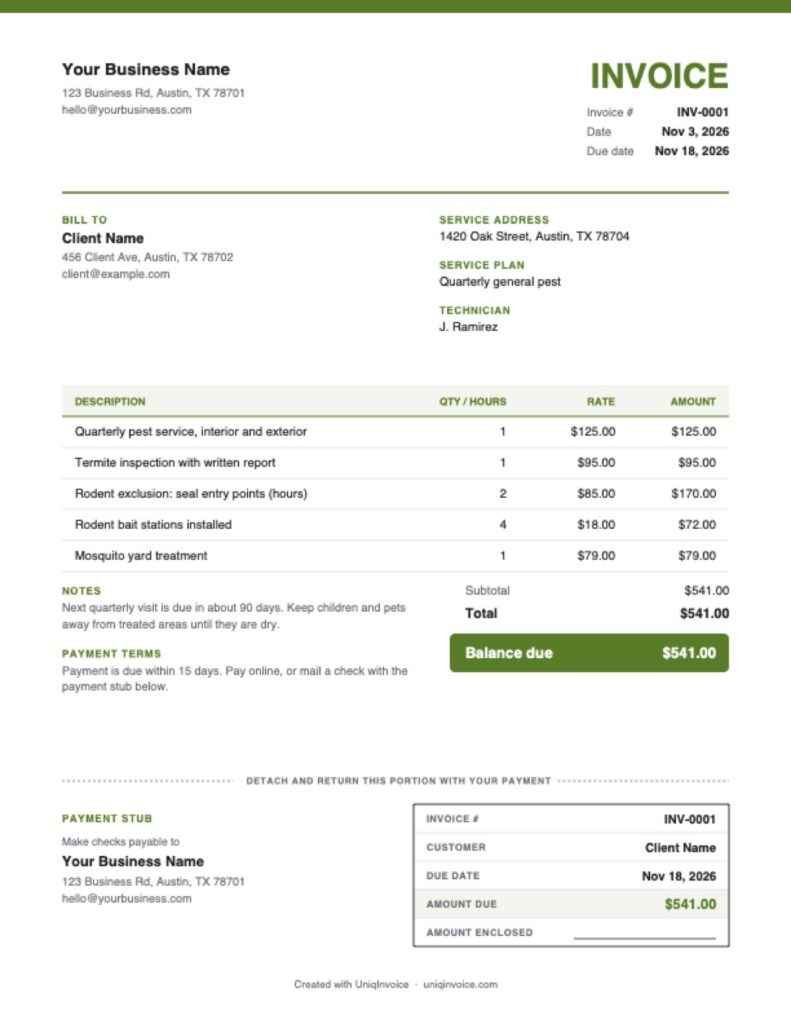
This free template has a tear-off payment stub at the bottom. Customers detach it along the dashed line and mail it back with their check, and the stub carries the invoice number, their name and the amount due, so every payment arrives with what you need to match it. The stub fills itself in from the invoice as you type.
What to include on a pest control invoice
- Business details: your company name, phone, email and your license number if your state requires it on paperwork.
- Customer and service address: the account holder and the property that was treated, which are not always the same.
- Invoice number and dates: a unique number, the invoice date and the due date.
- Services: each treatment, inspection or exclusion job on its own line.
- Materials: bait stations, traps or monitors you installed.
- Service plan: the plan the visit belongs to and when the next visit is due.
- Technician: who did the work, which helps when the customer calls with a question.
- Payment options: how to pay online and where to mail a check.
How to fill out this pest control invoice template
- Add your logo, company name and mailing address. The address also appears on the payment stub.
- Enter the customer, the service address, the plan and the technician.
- Check the invoice number and dates. The due date is set 15 days ahead.
- Edit the sample lines for treatments, inspections and materials.
- Set the sales tax rate if your state taxes pest control services.
- Review the notes and terms, then download the PDF. The stub prints at the bottom of the last page.
How pest control companies price their work
Service plans
A fixed price per visit or per month for regular treatments, often with free callbacks between visits. Bill the plan as one line so customers recognize it every time.
One-time treatments
A flat price for a specific problem such as bed bugs, wasps or a cockroach clean-out. Many companies charge more for the first visit and less for follow-ups.
Hourly and per-item work
Exclusion work, trapping and repairs are often billed by the hour, with bait stations and traps listed per item.
Getting paid by check without the guesswork
Checks often arrive without any reference, especially when someone else in the household writes them. A payment stub fixes most of that. The customer sends back the stub with the invoice number and amount, and you can record the payment in a minute. Leave the “Amount enclosed” line blank so the customer can note a partial payment, and put your mailing address on the stub where it is easy to copy onto an envelope.
Tips to get paid faster
- Invoice on the day of service. Customers remember the visit and are more likely to pay right away.
- Offer an online option too. Some customers will pay by card the same day instead of mailing a check.
- Keep plan pricing consistent. The same line and price each visit makes approval easy.
- Remind before the next visit. Ask about any open balance when you schedule the next treatment.
UniqInvoice helps pest control companies send invoices after every visit, set up recurring invoices for service plans and send automatic reminders.